Run Codex CLI in the cloud: where, and what each costs
You can run Codex in the cloud two ways: hand tasks to OpenAI's Codex cloud, which runs Codex's agent on VMs OpenAI manages, or install the Codex CLI on a Linux machine you rent, such as a GitHub codespace, an E2B sandbox or a shedix machine. Codex cloud is built for hands-off tasks on a repository; a machine of your own gives you the CLI itself, your own tools, and a terminal you can open from anywhere.
We make shedix. Every other figure comes from each provider's own pages. Links and dates sit beside each figure, as of 2026-11-11.
What is Codex cloud, and what isn't it?
Codex cloud runs each task in a VM that OpenAI manages, started from the ChatGPT web app, the Codex desktop app, or the terminal with codex cloud exec (a command OpenAI's CLI reference marks experimental). Per OpenAI's cloud environments docs:
- Size depends on your plan. Plus gets 2 vCPUs, 8 GiB of memory and 8 GiB of disk; Pro, Business, Enterprise and Edu get 4 vCPUs, 16 GiB and 32 GiB.
- An environment holds an install script, environment variables, and network secrets that a proxy fills in only for allowed hosts.
- State is kept for a while. A task's saved VM state can be recovered for up to seven days after you last use it.
- Repositories. GitHub.com repositories are set up for you, and a GitLab.com repository can be checked out through a reusable environment. Self-hosted GitHub Enterprise Server isn't supported.
- Included in ChatGPT plans. Cloud chats share your plan's allowance with local ones, though they "may use more" of it (pricing).
What it isn't: your Codex CLI on a computer you control. The docs describe no shell or SSH into the VM and no way to open a dev server it runs in your browser. Use Codex cloud for well-defined tasks on a repository, especially several at once, when you don't need to watch or step in.
How do I run the Codex CLI on a cloud machine?
Any Linux machine works. Install with OpenAI's script, which is also how you update (Codex CLI docs):
curl -fsSL https://chatgpt.com/codex/install.sh | sh
Connect it to your ChatGPT plan or an API key as the CLI docs describe (an API key is billed at API rates). Then run Codex inside tmux, so it keeps going when you disconnect:
tmux new -s codex
codex
Detach with Ctrl-b d, and tmux attach -t codex later. codex resume --last reopens the last conversation in that folder. tmux for coding agents has the rest.
Where can the CLI live?
- GitHub Codespaces is a dev container for coding sessions on a GitHub repository; the same install works there. It stops after 30 idle minutes by default and has a 12-hour maximum lifetime even in use. Files survive a stop; running processes, Codex included, don't. Codespaces alternatives for coding agents covers it in full.
- E2B is built for brief runs of code started from an SDK, which suits a product that runs Codex for its users. Its guide runs
codex execfrom a Codex template, and a session lasts up to 1 hour on Hobby and 24 hours on Pro (pricing). E2B alternatives has more. - shedix is a real computer in the cloud for your coding agents: a whole Linux machine with a full desktop, root, Docker, its own public address and every way in, with Codex, Claude Code and VS Code installed. Your agent can start and drive one itself and gets a browser it shares with you. You pay by the second while it works; then it sleeps by itself, keeping its programs (off your laptop).
Container, microVM or full VM compares the kinds of box in more depth, and cloud computers for AI coding agents lists more places an agent can live.
How do their prices compare?
Codex cloud has no price of its own: it uses your ChatGPT plan. The machines price in different units, so here is each in its own.
Per hour. E2B prices $0.0504 per vCPU-hour and $0.0162 per GiB-hour of memory, disk included, with sizes above 8 vCPU and 8 GiB on request (pricing). Codespaces prices $0.09 per core-hour with 4 GB of memory per core, from 2 cores and 8 GB, plus $0.07 per GB-month of storage (billing docs). shedix is $0.0450–$0.0525 per vCPU-hour all-in, with 2 GB of memory per vCPU and the disk included.
| One hour | 2 vCPU, 4 GB | 4 vCPU, 8 GB | 8 vCPU, 16 GB | 16 vCPU, 32 GB |
|---|---|---|---|---|
| shedix (disk included) | $0.09/hr (30 GB) | $0.21/hr (45 GB) | $0.42/hr (60 GB) | $0.84/hr (75 GB) |
| E2B (above 8 vCPU and 8 GiB on request) | $0.166 | $0.331 | $0.662 | $1.325 |
| Codespaces, nearest machine (twice the memory) | $0.18 (8 GB) | $0.36 (16 GB) | $0.72 (32 GB) | $1.44 (64 GB) |
A shedix machine costs 37–46% less than the same box on E2B, disk included. Codespaces machines carry twice the memory; a custom machine with the same 4 GB per core is $0.042 per vCPU-hour plus $0.00525 per GB-hour, which for 4 vCPU and 16 GB comes to 30% less than the codespace.
Per month. Used 4 hours on each of 22 workdays (88 hours), with shedix asleep the rest:
| A working month, 88 hours | 4 vCPU, 8 GB | 16 vCPU, 32 GB |
|---|---|---|
| shedix, asleep the rest | $24.26 | $89.33 |
| E2B usage, before its $150-a-month Pro plan for runs over an hour | $29.15 | $116.58 |
| Codespaces, nearest machine (twice the memory), plus storage | $31.68 (16 GB) | $126.72 (64 GB) |
For a working month shedix comes out 17–23% below E2B's usage alone and 23–30% below Codespaces (88 × $0.3312 and 88 × $1.3248 on E2B, 88 × $0.36 and 88 × $1.44 on Codespaces), with Codex, Claude Code, root and Docker ready and its programs kept through sleep, at $0.009/hr asleep for 4 vCPU, 8 GB RAM, 45 GB disk. Left on all month, a shedix machine is $153.30 for 4 vCPU and $613.20 for 16 vCPU; neither E2B nor Codespaces runs one session that long (24 hours on E2B Pro, 12 on Codespaces).
How do the options compare?
As of 2026-11-11, judged as a home for Codex:
| Codex cloud | GitHub Codespaces | E2B sandbox | shedix | |
|---|---|---|---|---|
| Kind of box | A VM per task, managed by OpenAI | A dev container on a VM | A sandbox started from code | A whole VM of your own, with a full desktop |
| Whole disk persists | A task's saved state, up to 7 days | Files survive a stop | Files and memory, if paused | Yes, the whole disk |
| Root and Docker | Codex's agent, not your shell | Inside a dev container; Docker through a feature | From a template | Root (sudo) and Docker, installed |
| How you get in | ChatGPT web, Codex app, codex cloud |
Browser, VS Code and SSH | Your code, through the SDK | SSH with your keys, VS Code or a terminal in the browser, the desktop, a phone |
| Your agent can start and drive it | Yes, with codex cloud exec |
Yes, with the gh CLI |
Yes, from its SDK | Yes, and it can move its conversation onto one |
| Sleeps by itself, keeping programs | Each task ends when done | Stops after 30 idle min by default; processes end; 12 h cap | Ends at its timeout unless paused | Yes; Codex working counts as use |
| What you pay while idle | Nothing beyond your plan | Storage | No compute once paused or ended | $0.009/hr for 4 vCPU, 8 GB |
| Price, 4 vCPU and 8 GB | Your plan's allowance | $0.36/hr with 16 GB, plus storage | $0.331/hr | $0.21/hr |
What does Codex get on a machine of its own?
On any machine you get the CLI, tmux and your own tools. On shedix a few things come with the machine:
- A terminal you can open anywhere. Codex opens in its own tab on the machine's page, from any browser, phones included. Machines run in the United States, and a sleeping machine wakes in under a minute.
- Tools for the agent. Codex gets a browser it shares with you, so you can watch it test a page and take over, and a full desktop for anything graphical.
- Move a conversation from your laptop. With our skill installed, ask Codex to "move this session to shedix so I can close my laptop". It follows our agents' guide: it copies the conversation from
~/.codex/sessions, marks the project folder trusted, and resumes it in tmux on the machine. - Codex and Claude side by side. Both run in tmux on the same machine, and a copy of a set-up machine starts ready for the next agent.
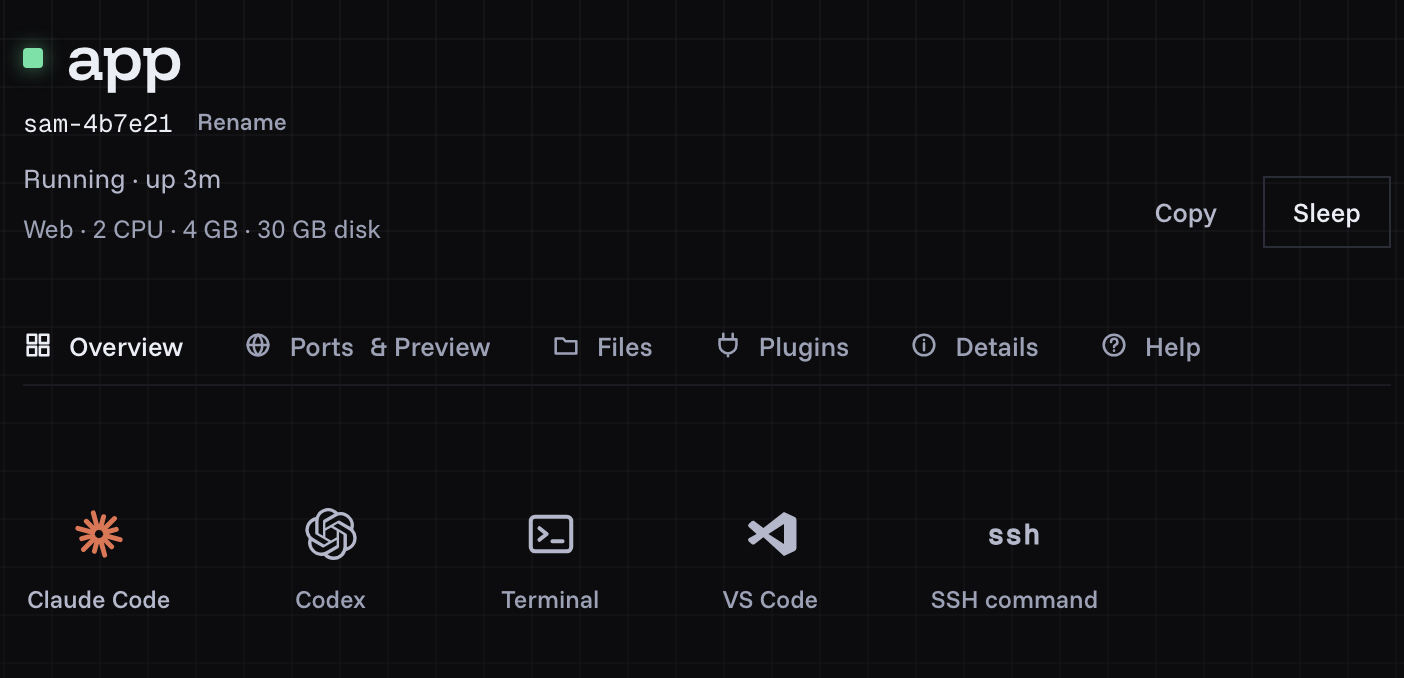
A machine's page: Codex and Claude Code each open in a tab, beside a terminal, VS Code and the SSH command.
Which should I use?
- Codex cloud for well-defined tasks on a repository, from the ChatGPT app or the web, with nothing to run.
- Codespaces for coding sessions under 12 hours tied to a GitHub repository.
- E2B if you're building a product that runs Codex for others.
- shedix for the Codex CLI on a whole machine with root and Docker, reachable from anywhere, that sleeps when you're done and keeps its programs.
If you use Claude Code as well, Claude Code cloud sessions or your own machine makes the same comparison for Anthropic's cloud.
Prices change, so check each provider's own pricing before you choose. Who we are is on our about page, and how machines are kept apart is on security.
What should I do next?
Install the shedix skill with npx skills add shedix-dev/skills -a codex, or start a machine; your first 12 hours of compute are on us.